So! You are new like me and would like know how it went. In case you are a data scientist reading this from the outside, here is a short version of how everything works, the short blog I wished i stumbled upon before.
I got started with HTML/HTMX by watching a few random youtube videos to get the general concepts, and then getting hands on replicating this simple site step by step. If you are on the same boat as me I suggest you do the same, and take this short post as an overview of what you will be doing. (This Python and this general repo have a lot of material that you can follow if you start at a slighly different place than me). Also, you know, read the docs and ask your friendly neighbourhood LLM for help when you get stuck.
Side tangent: Always read the docs first. If what you are using doesen't have good docs, stop using it. If you can't get it working from following the "Getting started!" tutorial in the docs, stop using it: you are doomed, run away. No LLM will make it better, The LLM is also trying to read the docs, and there are none. Other humans won't be of any help either, they don't have docs, and even if they can solve your problem, they should not. They should be warning you to stay away, don't bother, don't get in here, there are no docs.
Moving along. What we are building is a basic backend built in FastAPI that will return HTML to our browser. HTMX will help us make API calls that not refresh our whole page so it feels more modern, and Bootstrap will make everything look a little bit nicer.
If you know anything about web development, I'm guessing that reads as me avoiding using any big-boy tools. You are correct. I am trying to leverage the tools I already know (Python and FastAPI) and incorporate new technologies one at the time (the plan is to first learn HTML, then CSS, then switch to better tools). I want to produce a POC with as little code as possible, where I understand what everything does, before making the project any bigger than it needs to be.
Getting started
FastAPI is one of the easiest libraries to learn if you need to get started with python. You essentially write endpoints as functions and define the response as return values. Here is a simple main.py example:
from fastapi import FastAPI
app = FastAPI()

@app.get("/")
def root():
    return {"Hello": "World"}
Now start the server with fastapi dev main.py and just like that, you now have a working API. Access the correct route, and you will receive whatever object or value you define.
What we need to do is make the return value an HTML object so our browser can render it. HTML is easy to pick up at first (and then it gets weird), with a few caveats that took me way too long to understand. The most basics are:
- The head is just metadata stuff that will not get rendered directly, so:
- Anything you actually want in the page has to be in the body
So we can write a basic placeholder page and add it to the response object.
<!DOCTYPE html>
<head>
    <title>Basic HTML Page</title>
</head>
<body>
    <h1>Welcome to My Page</h1>
    <p>This is a simple HTML file with a header and body.</p>
</body>
</html>
And make the endpoint return this file instead of the hello world.
@app.get("/", response_class=HTMLResponse)
async def read_root():
    with open("index.html", "r", encoding="utf-8") as file:
        content = file.read()
    return HTMLResponse(content)
We now have an ugly looking static website. Drumroll please...
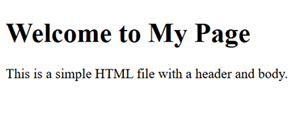
This is where I stopped every time I tried to start learning web development. The result is ugly and it usually took me a while to get here. It involved me having to use some uncomfortable big frameworks and libraries, with a large codebase I mostly didn't understand or know what it was for (Ever started a project on ruby? Neither have I, but I find it hilarious). Instead, I now have two files and maybe 30 lines of code.
So, the three main questions we want to be able to solve quickly, before we lose interest are:
- How do I make it more useful.
- How do I make this prettier
- How do I make feel modern
Make it more useful
First, make more endpoints for more pages. My goal was to have a landing page and a blog, so that's at least two routes that I want to build. We also want to start using a templating library to make all this HTML-ing a little more modular and dynamic.
Instead of rewriting everything from the beginning for our new page, we can create an inheritance type-thing by writing "templates" which to me translate to "modular blocks of HTML". Using a templating library you can stich them together to avoid having to rewrite stuff. So, we can have a base template with our headers or sidebars, and have our landing page and blog page inherit from them with this simple syntax.
We can write a basic template _base.html like:
<head>Your head stuff here</head>
<body>
    {% block content %}
    {% endblock %}
</body>
</html>
And now every new page can be written as:
{% extends "_base.html" %}
{% block content %}
    <body> This page's content </body>
{% endblock %}
Making it pretty
It turns out making a good looking website is way harder than I was expecting it to be! You essentially need to explicitly tell every single object how you want it to look. CSS is the tool for this, but if you write it inline like some tutorials tell you to, you quickly make your codebase a lot more complicated than before. The standard seems to be to write .css files that define how each object looks like, name your custom classes, and make your HTML object use them. I started doing it by hand, and it gave me really bad 'You'll spend your life here' vibe, so I stopped and looked for something more practical.
Tailwind is a library thingy that makes applying these standard styles little easier by having shorthands for common CSS expressions. I started to use it for a while, and it was easier to use than plain CSS, but it still made the HTML a little bit too crowded for my taste, and I had too much power in my hands. It felt like opening Photoshop for the first time, I didn't really know what the options were, I don't have a sense of style, and without a clear plan on what to create I was lost.
I finally settled for Bootstrap, a well-known library with prebuilt classes that my HTML object can inherit to give it a predefined style. It made everything look nice enough during prototyping that It didn't actively hurt to look at, and it didn't infest my HTML too much, so hopefully it's simpler to migrate out of lately. It also has a nice library of examples to look at, so you can just pluck elements out of the docs and implement them easily (streamlit style). The most useful feature for me is the build-in grid, so I could place a sidebar to select blogposts without much hassle.
My short time testing Bootstrap's alternatives helped me understand what it's doing for me. In my opinion, the issue with using high level abstractions when learning is that you don't know what you are abstracting out, so when something stops working for you, you are completely lost and you might as well start learning from 0. I am glad that I started by understanding the basics of CSS first, and I am aware that I will eventually have to go back to something more granular, but for what it's worth, I'm happy with my learning path.
Courtesy of an LLM, here is the same element rewritten in all three options:
<!-- Bootstrap -->
<button class="btn btn-primary">Click me</button>

<!-- Tailwind -->
<button class="bg-blue-500 hover:bg-blue-700 text-white font-bold py-2 px-4 rounded">Click me</button>

<!-- CSS -->
<button style="
    background-color: #0d6efd;
    color: white;
    padding: 8px 16px;
    border: none;
    border-radius: 4px;
    font-weight: 600;
"> Click me
</button>
Making it feel modern
Here is where HTMX comes in. After building two pages, adding a navigation bar and link to a few sample blogposts, the basics were there. However, when you click a button in vainilla HTML you issue a GET request and recieve a whole new page. Modern websites don't work like that anymore. You usually just want a section of a page to update, not to get flash banged with a stutter on every interaction.
HTMX lets you do just that. Inside any element you can indicate when to issue a request, to what endpoint, and where to place the returned HTML. This lets you swap elements on the fly, as your endpoints can now return fractions of HTML instead of whole pages. Here is the code that powers the buttons on the sidebar for my blog (without the boostrap for clarity), swapping the main body of a page for the correct blogpost, without reloads.
{% for entry in entries %}
    <button
        hx-get="/blog/blogpost?path=website/{{ entry.path }}"
        hx-target="#blog-content"
        hx-swap="innerHTML"
        hx-push-url="false">
    {{ entry.title }}
    </button>
{% endfor %}
<div class="#blog-content"><div>
This essentially says "Whenever someone clicks you, issue a GET request to /blog/blogpost/ and replace the #blog-content div with whatever you recieve". The endpoint, if you are interested, goes:
@router.get('/blog/blogpost')
def blogpost(request: Request, path: str):
    if request.headers.get("HX-Request"):
        with open(f'{path}.md', 'r') as f:
            md_content = f.read()
            content = markdown.markdown(md_content)
            return templates.TemplateResponse('blogpost.html', {"request": request, "content": content})
And blogpost.html only has {{ content|safe }} inside
Once again, this was really fun for me, as it forced me to understand the basics of HTML a lot more that I would have otherwise, since I was interacting with it a lot more directly.
That's pretty much it. The content of my site are a few markdown files, three endpoints and 5 HTML files. Underwhelming? Maybe, but it completely fulfils my needs. I feel like I have the basics down, I understand every line of code and know how to make it better in any way that I want to, so honestly, I couldn't be happier.